vue3 + vite 项目搭建 - 配置eslint
安装依赖"devDependencies": {"standard": "^16.0.3","vue-eslint-parser": "^7.10.0","@typescript-eslint/parser": "^4.29.0","@typescript-eslint/eslint-plugin": "^4.29.0","eslint-plugin-vue": "^7.15.1","eslint
·
安装依赖
 "devDependencies": {
 	"@typescript-eslint/eslint-plugin": "^5.10.1",
    "@typescript-eslint/parser": "^5.10.1",
    "eslint": "^8.7.0",
    "eslint-config-prettier": "^8.3.0",
    "eslint-plugin-import": "^2.25.4",
    "eslint-plugin-prettier": "^4.0.0",
    "eslint-define-config": "^1.2.3",
    "eslint-plugin-vue": "^8.3.0",
    "prettier": "^2.5.1",
    "vue-eslint-parser": "^8.2.0",
   }
如果想使用最新版本的,可以新增一个命令
"scripts": {
    "update": "ncu -u && yarn"
  },
配置规则 在根目录创建 .eslintrc.js
// @ts-check
const { defineConfig } = require('eslint-define-config')
module.exports = defineConfig({
  root: true,
  env: {
    browser: true,
    node: true,
    es2021: true,
  },
  parser: 'vue-eslint-parser',
  parserOptions: {
    parser: '@typescript-eslint/parser',
    ecmaVersion: 'latest',
    sourceType: 'module',
    jsxPragma: 'React',
    ecmaFeatures: {
      jsx: true,
    },
  },
  extends: [
    'plugin:vue/vue3-recommended',
    'plugin:@typescript-eslint/recommended',
    'prettier',
    'plugin:prettier/recommended',
  ],
  rules: {
    'vue/script-setup-uses-vars': 'error',
    '@typescript-eslint/ban-ts-ignore': 'off',
    '@typescript-eslint/explicit-function-return-type': 'off',
    '@typescript-eslint/no-explicit-any': 'off',
    '@typescript-eslint/no-var-requires': 'off',
    '@typescript-eslint/no-empty-function': 'off',
    'vue/custom-event-name-casing': 'off',
    'no-use-before-define': 'off',
    '@typescript-eslint/no-use-before-define': 'off',
    '@typescript-eslint/ban-ts-comment': 'off',
    '@typescript-eslint/ban-types': 'off',
    '@typescript-eslint/no-non-null-assertion': 'off',
    '@typescript-eslint/explicit-module-boundary-types': 'off',
    '@typescript-eslint/no-unused-vars': [
      'error',
      {
        argsIgnorePattern: '^_',
        varsIgnorePattern: '^_',
      },
    ],
    'no-unused-vars': [
      'error',
      {
        argsIgnorePattern: '^_',
        varsIgnorePattern: '^_',
      },
    ],
    'space-before-function-paren': 'off',

    'vue/attributes-order': 'off',
    'vue/one-component-per-file': 'off',
    'vue/html-closing-bracket-newline': 'off',
    'vue/max-attributes-per-line': 'off',
    'vue/multiline-html-element-content-newline': 'off',
    'vue/singleline-html-element-content-newline': 'off',
    'vue/attribute-hyphenation': 'off',
    'vue/require-default-prop': 'off',
    'vue/require-explicit-emits': 'off',
    'vue/html-self-closing': [
      'error',
      {
        html: {
          void: 'always',
          normal: 'never',
          component: 'always',
        },
        svg: 'always',
        math: 'always',
      },
    ],
    'vue/multi-word-component-names': 'off',
  },
})
在默写文件或页面禁用eslint 根目录创建 .eslintignore
/dist/*
/node_modules/**
/public/*
配置prettier规则 在根目录创建 prettier.config.js
// prettier.config.js
module.exports = {
  printWidth: 100,
  semi: false,
  vueIndentScriptAndStyle: true,
  singleQuote: true,
  trailingComma: 'all',
  proseWrap: 'never',
  htmlWhitespaceSensitivity: 'strict',
  endOfLine: 'auto',
}
某些页面禁用 prettier 根目录创建 .prettierignore
/dist/*
/node_modules/**
/public/*
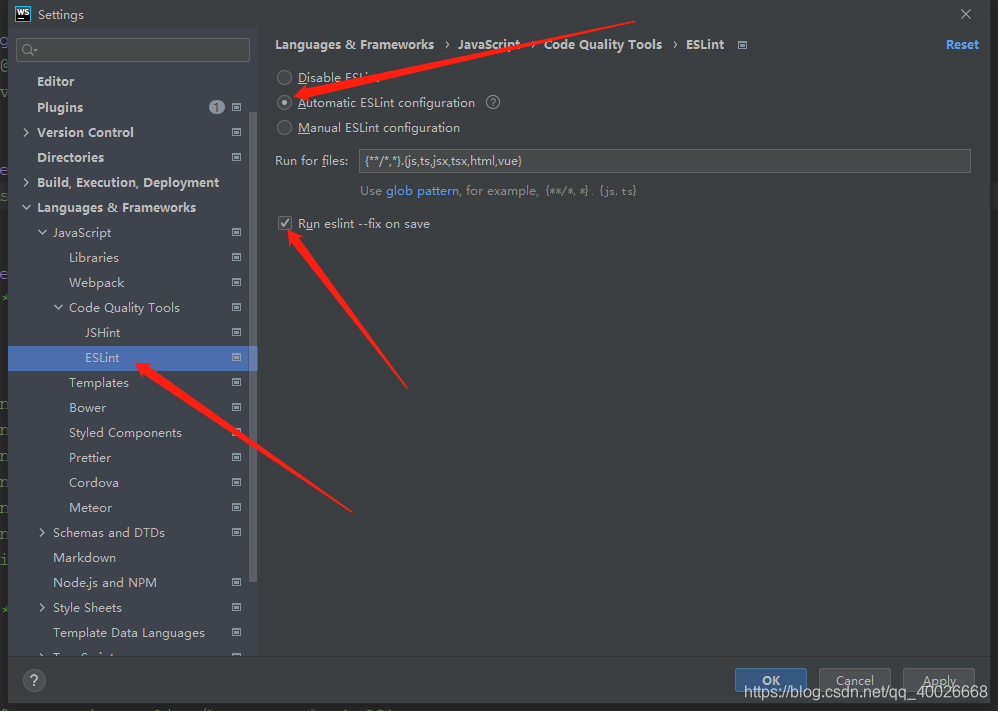
使用eslint,我这里是借助开发工具 WebStorm,其他开发工具可以自行搜索对应的功能
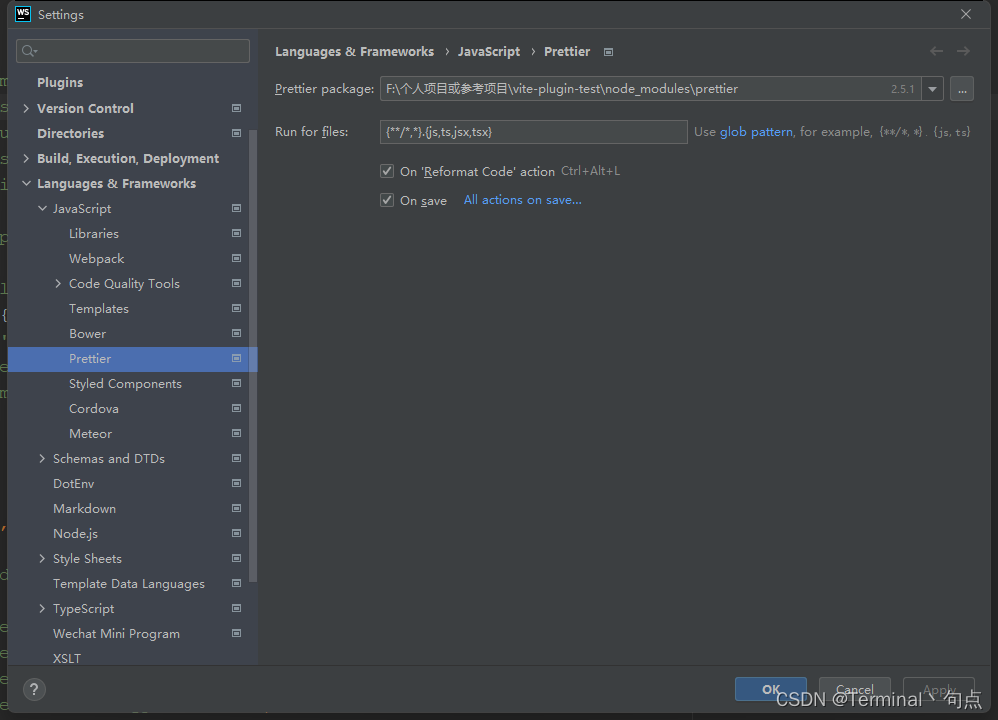
使用prettier

OpenTiny 是企业智能前端开发解决方案,以生成式 UI 和 WebMCP 两大自主核心技术为基础,加速企业应用的智能化改造。我们会在社区定期为大家分享一些前后端的技术文章。
更多推荐


 1
1 0
0- 0


 已为社区贡献1条内容

所有评论(0)